BBCode
When a textbox is selected within the Ritual Designer, you will notice a mini BBCode menu is displayed.
To the right of the BBCode menu is a “Preview” button which will deselect the textbox when pressed. This allows the BBCode tags to instead display the actual BBCode. For single-line textboxes, you can alternatively press the enter key on your keyboard.
The following BBCode explanations reference the official Godot documentation.
For a detailed view of the full BBCode capabilities of Lilith’s Guidance, please read the linked page.
Color Codes
Section titled “Color Codes”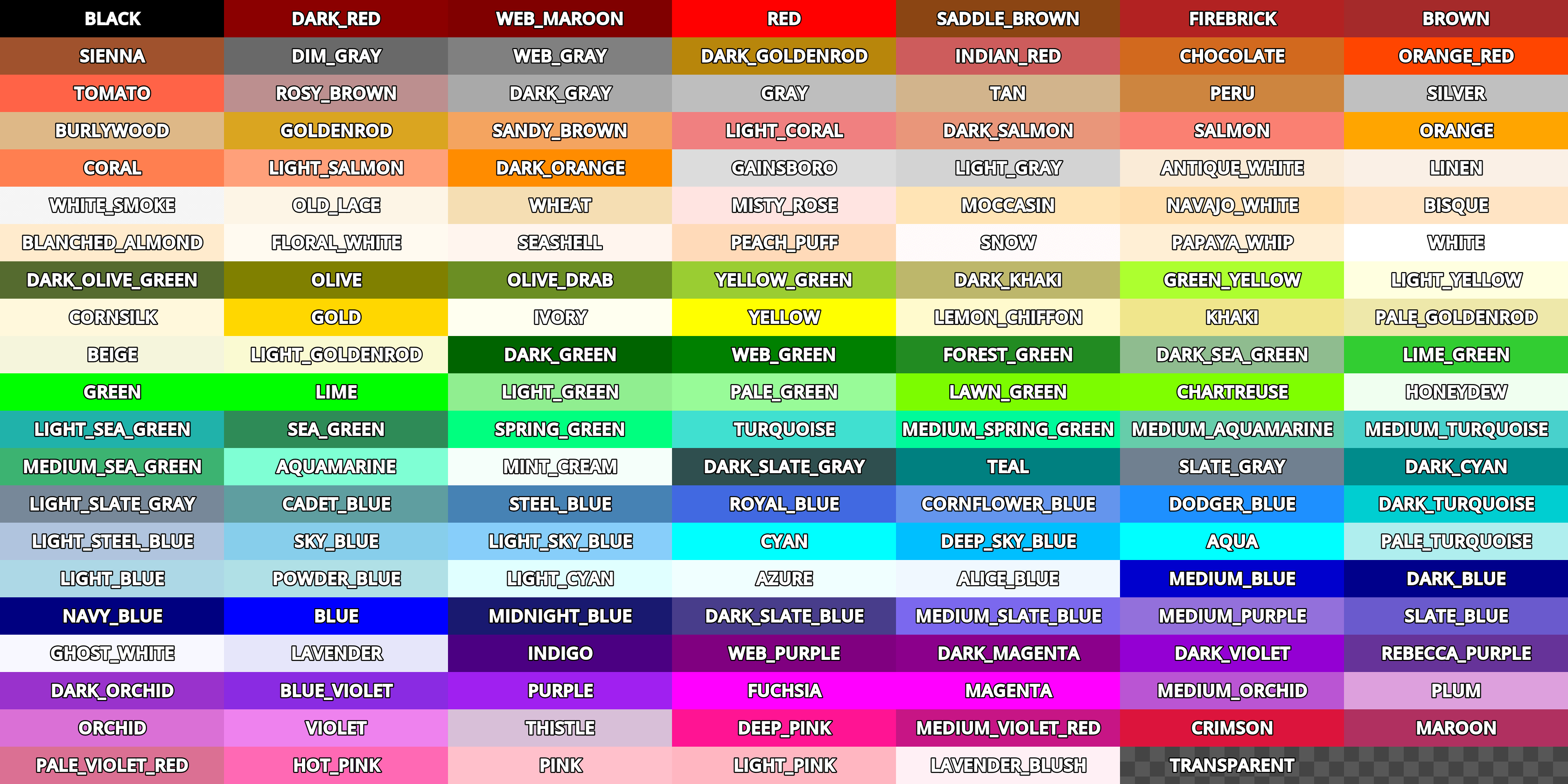
When using color tags, such as [color=red]text[/color], the specified color must be one of these named colors.
Alternatively, you can also specify a color using a hexidecimal code, such as [color=#ff00ff]text[/color].
The color picker (indicated by a dropper icon in the mini BBCode menu) will let you choose a color from a color wheel and will input its hexidecimal code for you.